

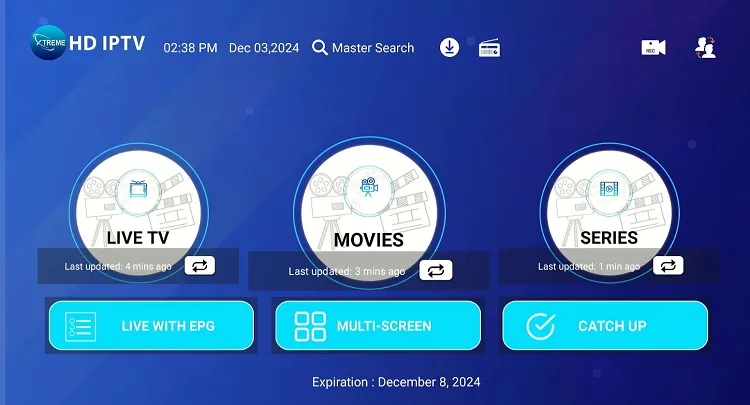
Xtreme IPTV HD App is the easiest way to enjoy live TV, sports, and movies in HD on your Amazon Fire Stick? This complete tutorial will show you how to install and set up the Xtreme HD TV App, powered by Smarters Pro Premium.
Follow these steps to stream thousands of HD channels from the USA, UK, Canada, and worldwide with lightning-fast speed and reliability.
Table of Contents
What Is Xtreme HD IPTV?
Requirements Before Installation
How to Install Xtreme HD IPTV on Fire Stick
How to Set Up Xtreme HD IPTV App
Tips for the Best Streaming Experience
Final Thoughts
Table of Contents
What Is Xtreme HD TV?
Xtreme IPTV HD is a top-rated IPTV service in 2025, offering access to over 20,000 live TV channels, movies, and sports events in full HD and 4K.
Built on the Smarters Pro Premium platform, the app provides an intuitive and secure streaming interface compatible with Fire Stick, Android, and Smart TVs.
If you’re new to IPTV, check out this helpful guide on how IPTV technology works for background on how services like Xtreme IPTV deliver your favorite content.
Requirements Before Installation
Before you start installing XtremeHD IPTV, make sure you have:
- A working Amazon Fire Stick or Fire TV device
- A fast internet connection (minimum 10 Mbps recommended)
- An active Xtreme HD IPTV subscription (get one at https://iptvxtremehd.com)
- The Downloader app installed (free on the Amazon App Store)
For more tips on preparing your Fire Stick, visit Amazon’s Fire TV support page.
How to Install Xtreme TV HD on Fire Stick
Follow these steps to install the Xtreme HD TV App safely and easily:
Step 1: Enable Apps from Unknown Sources
- Go to Settings → My Fire TV → Developer Options.
- Turn Apps from Unknown Sources ON.
This allows you to install third-party apps like Xtreme HD IPTV.
Step 2: Install the Downloader App
- On the Fire Stick home screen, open the Search icon.
- Type Downloader and install it from the results.
- Open the Downloader app when it’s installed.
Step 3: Download the Xtreme TVHD App
- Launch Downloader.
- In the URL box, enter the download link from Xtreme PTV.
- Click Go to begin downloading the APK file.
- When the download completes, select Install.
- Once done, click Open to launch the app.
How to Set Up Xtreme IPTV HD App
Once installed, setting up Xtreme IPTV on your Fire Stick is simple:
- Open the Xtreme IPTV App.
- Choose “Login with Xtream Codes API.”
- Enter your credentials:
- Username
- Password
- Server URL (provided in your activation email)
- Click Add User.
- Wait for the channels and VOD sections to load — you’re ready to stream!
Tips for the Best Streaming Experience
✅ Use a VPN for enhanced privacy and better performance (see What Is a VPN?).
✅ Connect via Ethernet or 5GHz Wi-Fi for stable streaming.
✅ Restart your Fire Stick every few days to clear memory.
✅ Update the Xtreme IPTV App regularly to get new features and fixes.
Final Thoughts
Installing Xtreme TV HD on Fire Stick gives you access to premium entertainment anytime, anywhere.
With its Smarters Pro Premium base, intuitive design, and HD content library, this app makes it easy to enjoy your favorite channels and movies in one place.
For subscription details and support:
🌐 Visit: https://iptvxtremehd.com